The problem
You’re working away in your project. Time to commit your changes.
gcb new-branch # git checkout -b "new-branch"
gcam 'It actually works!' # git commit -am "It actually works!"
But something went wrong between gcb and gcam, and it’s easy to miss…
fatal: a branch named 'new-branch' already exists
This is so easy to miss because, at a glance, it looks almost identical to the success message. Spot the difference:
# Succeeded!
Switched to a new branch 'new-branch'

# Failed!
fatal: a branch named 'new-branch' already exists
Anyway, you’ve just committed your changes to the wrong branch. Dafty. Hopefully you haven’t pushed at this point too.
To undo your commit, you can run:
git reset --soft HEAD^
Make sure you use
--softand not--hard. If you ever accidentally use--hard, look intogit reflogand you might be able to save yourself. No promises though.
No big deal really, but it would have been sweet to not have made this mistake in the first place. Lets make the error more obvious.
The solution
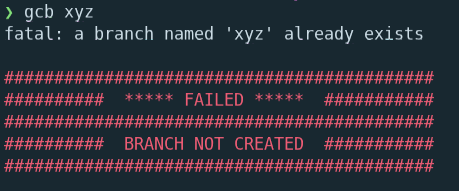
We can add this to our ~/.zshrc file:
# ~/.zshrc

# Remove the default alias for `gcb`
unalias gcb 2>/dev/null

gcb() {
  git checkout -b "$@"
  if [ $? -ne 0 ]; then
    RED="\033[31m"
    RESET="\033[0m"

    echo
    echo "${RED}###########################################${RESET}"
    echo "${RED}##########  ***** FAILED *****  ###########${RESET}"
    echo "${RED}###########################################${RESET}"
    echo "${RED}##########  BRANCH NOT CREATED  ###########${RESET}"
    echo "${RED}###########################################${RESET}"
    echo
  fi
}
Much better!